



WordleBot
Word guessing Games like WordleBot

WordleBot

WordleBot

WordleBot is a solver companion for Wordle, not a separate puzzle. You keep playing Wordle in your usual tab, then mirror each guess here to see which words the math says you should try next. Type your last five letters, tap each tile until green, yellow, and gray match what Wordle showed, and press calculate. The tool scans thousands of valid answers and returns a ranked shortlist with real numbers behind every suggestion.

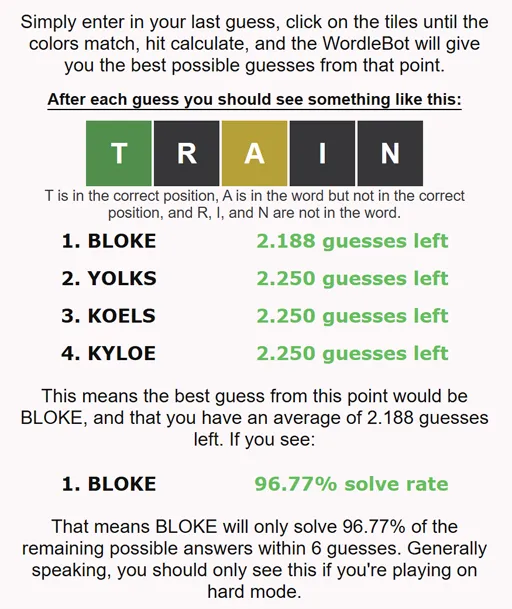
That shortlist is where most players get hooked. You might see BLOKE listed first with 2.188 guesses left, meaning that word splits the remaining pool most efficiently on average. YOLKS, KOELS, and KYLOE can sit close behind with slightly higher averages. On hard mode you may also see a solve rate, such as 96.77%, which tells you how often that guess finishes the puzzle within six tries. It turns gut feeling into something you can compare turn by turn.

How to Play WordleBot

1
WordleBot tile color picker matching a Wordle guess

Enter your guess and set the tile colors

Type the five letter word you just played in Wordle. Click each tile to cycle through gray, yellow, and green until the colors match your game board exactly. Green means the letter is correct and locked in place. Yellow means the letter is in the answer but sitting in the wrong column. Gray means the letter is not in the word at all.

2
WordleBot ranked guess list with average guesses remaining

Calculate and read the ranked suggestions

Press calculate and WordleBot returns up to five candidate words ordered by efficiency. Each entry shows how many guesses you would still need on average if you played that word next. Pick the top result when you want the safest path, or scan the list when you prefer a word you actually know how to spell.

3
Using WordleBot alongside an active Wordle puzzle

Repeat after every turn until the word is solved

Play the word you chose in Wordle, then come back and enter the new guess with updated colors. WordleBot recalculates from the smaller remaining pool each time. Keep the Wordle tab and the solver tab side by side so you never lose track of which letters are confirmed.

How the calculator thinks about your board

Every recommendation starts from the set of answers still compatible with your green, yellow, and gray tiles. WordleBot scores each possible guess by asking a simple question: if I play this word and Wordle responds, how small does the remaining list become on average? That is why two words that look equally reasonable to a human can land far apart in the rankings.

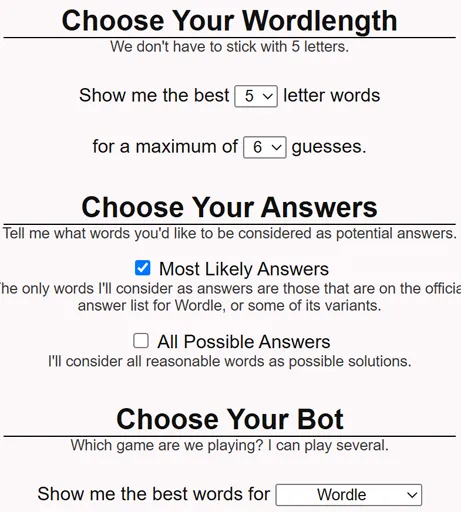
The tool can run against the official answer list only or widen the search to every valid guess word. Wider pools produce more creative suggestions but take longer to feel decisive. Most players stick to the answer list until they are down to a handful of options, then switch if they need a distinguishing guess word that is not an answer itself.

Walking through a real example

Suppose you played TRAIN and Wordle returned green on T, yellow on A, and gray on R, I, and N. After you mirror those colors in WordleBot and calculate, the top row might read BLOKE with 2.188 guesses left, followed by YOLKS, KOELS, and KYLOE each near 2.250. The gap looks tiny, but over thousands of simulated boards that edge adds up.

You type BLOKE in Wordle, get fresh colors, return to the bot, update the tiles, and calculate again. Each cycle shrinks the candidate pool. The process feels manual compared with an auto solver, yet that friction is the point: you still read the feedback and choose words yourself, which is how most people actually improve.

Testing whether your opener is worth keeping

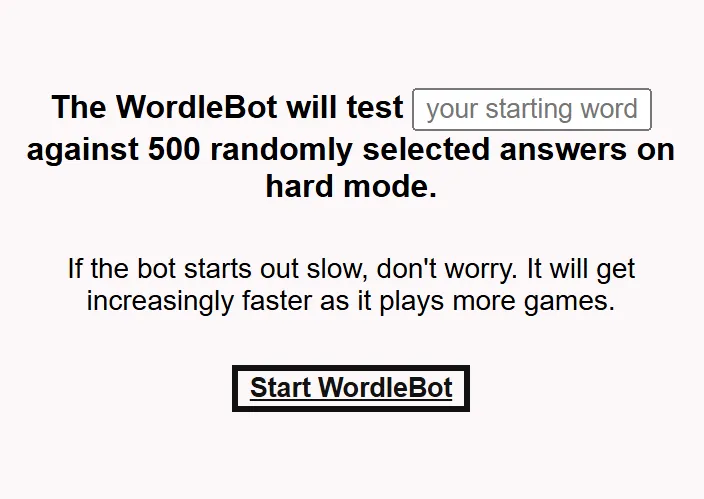
First guesses matter because they set the information budget for the entire puzzle. WordleBot lets you stress test any opener by pitting it against five hundred random answers and showing where it ranks. A word you love because it sounds smart might land mid pack, while a boring mix of common consonants and vowels might quietly outperform it.

The daily top ten list offers another angle. It refreshes with the current puzzle context in mind, drawing from a database of more than four thousand words. Treat it as a menu of vetted options rather than a command. If your tested opener beats the list, keep your habit. If it does not, borrow one suggestion and see whether your solve path feels smoother.

When hard mode changes the numbers

Hard mode Wordle forces every green and yellow letter into your next guess. That constraint collapses the search space faster but also removes flexible fishing words. WordleBot adjusts its math accordingly and surfaces solve rate percentages that normal mode hides. A guess with a 96.77% solve rate is strong, yet the missing fraction represents boards where six guesses will not be enough if you commit to that path.

Players who toggle hard mode on for extra discipline often use WordleBot to avoid dead ends. When every hint must be honored, picking a word that technically fits the colors but wastes a slot becomes costly. The ranked list becomes less about vocabulary showmanship and more about staying inside the narrow corridor the rules allow.

FAQs about WordleBot

WordleBot analyzes your current Wordle board and recommends the most efficient next guesses. It works from the official answer list and can optionally include the broader guess pool. You stay in control of Wordle itself while the tool handles the probability math.

That number is the average number of guesses still required after playing the suggested word, assuming optimal play from that point forward. Lower is better. A top pick like BLOKE at 2.188 beats options sitting at 2.250 because it narrows the answer set more sharply.

Solve rate shows what fraction of remaining possible answers would be found within six total guesses if you played that word next. You mostly see this in hard mode, where confirmed letters must be reused. A 96.77% solve rate means a small slice of answers would still slip past six tries.

Yes. The tool publishes a daily list of ten strong starters generated from a large word database. You can also run a separate opener test: enter any five letter word and the bot ranks it against five hundred random answers so you can see whether your favorite first guess is actually doing work.

Yes. Toggle hard mode when your Wordle settings require every revealed hint to appear in later guesses. The calculations respect those constraints, which is why solve rate stats become more useful when the board gets tight.

No word wins every day forever. Optimal openers shift with the answer pool and your personal vocabulary. WordleBot gives data driven starters rather than a fixed mantra, and the opener test lets you compare your habit against a random sample.

Yes. WordleBot runs in the browser with no subscription and no account. Open the tool, enter your tiles, and calculate as many turns as you need while you work through a puzzle.