




Outspell is a fast, modern word game that plays right in your browser. You build high-scoring words, chain multipliers, and out-think your opponent with flexible rack management. It is simple to start yet deep enough for players who love vocabulary, optimization, and clever board control. You draw seven tiles and connect letters horizontally or vertically to form valid words. Score comes from letter values and board multipliers; using all seven tiles in one turn earns a bingo bonus. A typical game runs a few minutes—perfect for a quick break—and the rhythm of draft, place, score, and plan keeps each round satisfying. Because Outspell runs in the browser, there is no friction: no installs or accounts. With practice, you learn to spot high-value overlaps, deny premium squares to your opponent, and close out with efficient rack dumps.
Outspell
Outspell is a fast, modern word game that runs right in your browser. The goal is simple: form valid words using the letters on your rack and place them on the board to score more points than your opponent. The rules are similar to the classic game of Scrabble: you draw seven tiles, then connect letters horizontally or vertically to build words. Each letter has a point value, and the board has special bonus cells—blue for letter multipliers and red for word multipliers—so placing tiles on those squares can multiply your score and add a layer of strategy to every move.
Your first word must pass through the center star. After that, every new word you play must share at least one letter with a word already on the board, and tiles must lie in a single line (horizontal or vertical). You can extend existing words by adding letters (for example with common prefixes and suffixes like -ED, -ER, RE-, or UN-) or spell entirely new words that cross them. If you cannot form a word, you can use the Exchange option to swap some or all of your tiles; this skips your turn but can give you a better rack for the next round. Using all seven tiles in one turn earns a bingo bonus, so planning ahead and keeping a mix of vowels and consonants on your rack helps.
Outspell is designed for quick sessions: a typical game lasts a few minutes, making it ideal for a short break at school, work, or home. There are no installs or accounts required—you open the page and start playing. The interface is clean and readable, with drag-and-drop tiles that work with both mouse and touch, and subtle audio feedback that makes each placement satisfying without getting in the way. You play solo against a computer opponent, so you can focus on building your vocabulary, learning board control, and finding high-scoring overlaps. With practice, you learn to stretch toward premium squares, avoid opening triple-word lines for the opponent, and close out the game with strong final moves. Whether you are aiming to beat your personal best or simply relaxing with a quick puzzle, Outspell keeps the challenge engaging and the learning curve friendly.
How to Play Outspell
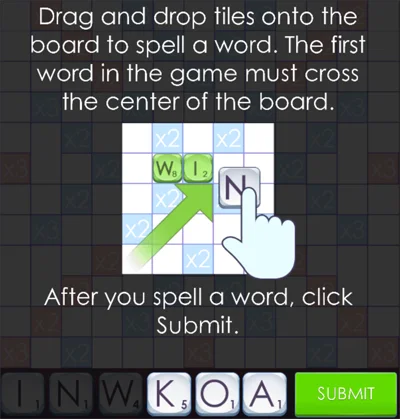
Place your first word
Drag and drop tiles from your rack onto the board to spell a word. Your first word must pass through the center star. Use bonus cells to earn more points: blue cells multiply letter value, red cells multiply the whole word score.
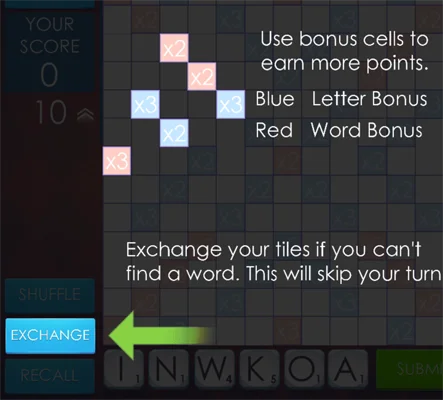
Use bonus cells and exchange tiles
Blue cells give letter bonuses; red cells give word bonuses. If you cannot find a word, use Exchange to swap tiles—it skips your turn but can reset a bad rack and give you a better draw next time.
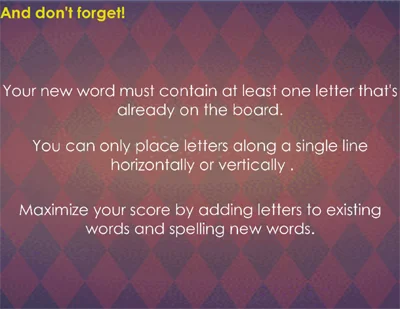
Connect and extend words
Every new word must contain at least one letter already on the board, placed in a single line horizontally or vertically. Maximize your score by adding letters to existing words and forming new words. Use prefixes and suffixes like -ED, RE-, UN- to extend words; try to reach premium cells and use all seven tiles for a bingo bonus.
About Outspell
Key features
- Solo play: Play against the computer. Outspell supports both short sessions and longer games.
- Clear presentation: Clean visuals, readable tile animations, and subtle audio feedback make each placement satisfying without distractions.
- User-friendly controls: Drag-and-drop tiles with mouse or touch. Easy for new players and deep enough for experts chasing high scores.
- Instant play: Runs in the browser with fast loads and no installs. Open, play, and finish a full game in minutes.
Tips for better play
- Multipliers: Stretch toward premium cells even when the base word is short.
- Rack balance: Keep a mix of vowels and consonants; use Exchange when stuck.
- Prefixes and suffixes: Add -ED, -ER, RE-, UN-, and common hooks to extend words.
- Defense: Avoid opening triple-word lines unless you can control the reply.
- End game: Track remaining tiles and set up high-value closures.