



Connect Game
Games similar to Connect Game

Connect Game

Connect Game

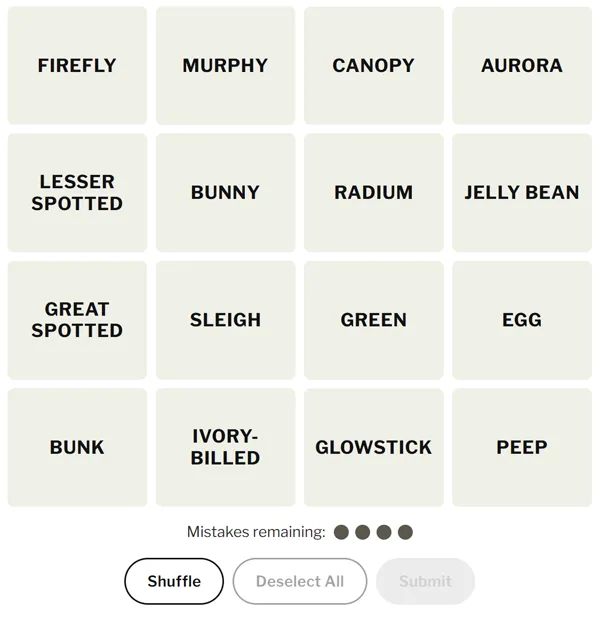
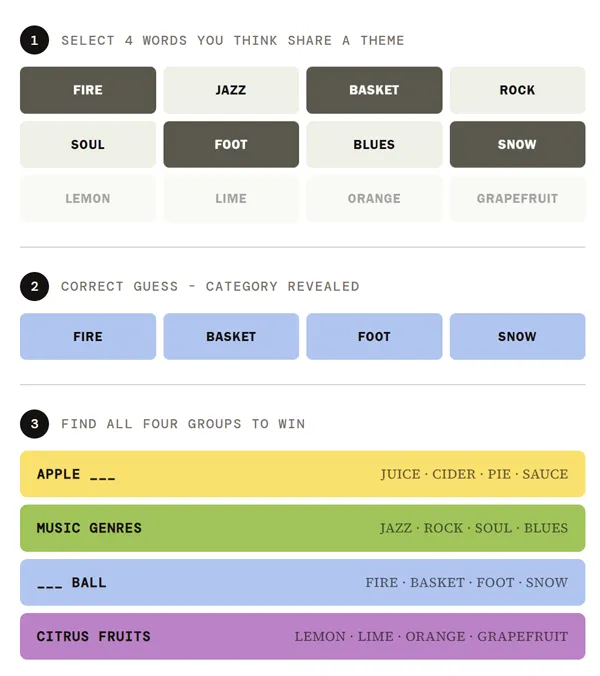
Connect Game is a grouping puzzle built from sixteen short words on a single board. Hidden beneath the surface are exactly four themes, and each theme ties together four words and no more. Your task is to discover those quartets before your allotted mistakes disappear. The rules read like a tidy sorting exercise; in practice, several words are deliberately placed to look as if they belong to the same obvious bucket when they actually split across different solutions. That tension—between what feels natural and what the puzzle author intended—is where the game earns its bite.

You work in rounds of selection: pick four tiles you believe share one secret category, then confirm your guess. A correct set locks in place, usually with a colour band and a short label that explains the link. A wrong guess consumes one mistake from a small fixed budget—commonly four in total—so early aggression can end the run quickly. There is no partial credit for two correct words paired with two intruders; the board only rewards a full group of four. When you are almost right, many versions whisper a hint such as “one away,” meaning three of your four choices truly belong together and one is the odd word out. That single clue is precious: treat it as a reason to pause and reshuffle your hypotheses instead of burning another slot on impulse.

Most editions ship with a daily puzzle everyone sees on the same calendar day—ideal for comparing results with friends—and an unlimited or practice mode that keeps serving fresh boards when you want more reps. A shuffle control rearranges the grid without changing the words themselves, which helps break visual ruts. When you finish, you can often copy a compact summary of how many groups you solved and how many mistakes you used, which makes lightweight bragging or commiseration easy in chat. The entire experience is designed for the browser, so you can play on a phone during a commute or on a desktop with a proper keyboard.

How to Play Connect Game

1
Sixteen words on the Connect Game board

1. Read the whole grid

Scan all sixteen words before tapping anything. Note pairs that feel too easy—those are often decoys that belong to different categories.

2

2. Select four and submit

Highlight four words you think share one theme, then submit. Correct groups are revealed and removed from play; wrong guesses cost a mistake.

3

3. Clear all four groups

Repeat until every word is assigned or you run out of mistakes. Solving with no wrong guesses is the cleanest win.

Why the obvious guess fails

Skilled authors load the grid with red herrings: words that sit comfortably next to a theme in everyday speech yet officially belong elsewhere. A term might look like part of a music genre cluster until you realize it was chosen for a sports pun, a shared suffix, or a fill-in-the-blank pattern (“all of these can follow ___”). The lesson is to treat first impressions as hypotheses, not conclusions. When two equally strong quartets compete for the same anchor word, postpone the decision until another group elsewhere on the board collapses the ambiguity.

Working backwards from five is a classic sanity check. If you are convinced five words could share one theme, you are overfitting: four belong together and one must migrate. Identifying the stray often unlocks two real groups in a single insight. Likewise, after a “one away” message, resist the urge to change only one tile at random; instead, list which three tiles were almost certainly correct and test which single swap preserves the hidden pattern the puzzle rewards.

Pace, shuffle, and mistake discipline

Because mistakes are capped, submit your strongest quartet first. Removing sixteen words down to twelve clarifies what remains and reduces the combinatorial fog. If you are unsure between two medium-confidence sets, look for the group whose link is more specific—narrow themes beat vague associations when the editor had to choose exactly four members.

Use shuffle whenever you keep seeing the same false pattern simply because two tiles sit beside each other. Spatial proximity is not part of the rules, yet our eyes treat neighbours as related. Breaking that layout nudges you to read the board as a bag of tokens again. Between submissions, mentally rehearse alternative categories for your shortlist so a rejection does not leave you empty-handed.

Wordplay categories you should expect

Many solutions hinge on lateral links rather than encyclopedic trivia: homophones, words that only make sense with a missing head or tail, items that share a single modifier, or titles that fit a silent rule you only notice after the reveal. Training yourself to ask “What if these all precede the same noun?” or “Could this be about spelling, not meaning?” mirrors how regulars dissect dailies. The unlimited queue is the right place to internalize those patterns without the pressure of a shared scorecard.

Daily mode, by contrast, is a social object: identical words mean your friends hit the same traps. Trading stories about which red herring almost broke your streak is half the fun. Whether you chase a flawless sheet or simply clear the board before the mistake counter hits zero, the structure stays identical—only the vocabulary and the mischief change.

Quick reference habits

  • Full pass first: Read every word once before locking a theory.
  • Bank your surest group: Confirm it early to shrink the search space.
  • Respect the hint: “One away” means edit carefully, not spam guesses.
  • Shuffle when stuck: Remove accidental visual grouping bias.
  • Share tactfully: Use the built-in summary so you do not spoil specific themes for others.

FAQs about Connect Game

You can play Connect Game right here at https://wordles.org/word-games/connect-game/. Use the play button on this page to open the game—no download required. You can also play directly at https://connect.game/.
Daily boards typically rotate once every calendar day based on your device clock or the server schedule, so everyone gets the same sixteen words until the next cycle begins.
Unlimited mode skips the shared daily and generates new puzzles on demand so you can keep practicing grouping logic without waiting for midnight.
After finishing, use the copy or share control if the build offers one; it usually pastes a compact text grid showing solved groups and how many mistakes you used.
Once a group is confirmed, it is often tinted with a distinct colour so you can tell completed themes apart at a glance. Colours are cosmetic labels for those four categories, not difficulty tiers.
It signals that exactly three of your four selected words belong to the same real group and one word is the impostor. Swap out suspects before submitting again.
Many browser versions store streaks and win counts locally on your device, while signed-in accounts may sync across machines. Clearing site data can reset local stats.
Yes. The usual build is free in the browser with both daily and unlimited modes available without a purchase.